Updated: August 2026
If you are applying for an NBI Clearance in the Philippines, one of the most common questions is simple:
How much does NBI Clearance cost in 2026?
The basic NBI Clearance fee is:
₱130
However, this is not always the final amount you will pay.
An additional e-payment service charge is usually added depending on the payment channel you choose.
According to the National Bureau of Investigation’s current application guide, the service charge is generally around ₱25 to ₱30.
Estimated Total NBI Clearance Cost
- NBI Clearance Fee: ₱130
- E-payment Service Charge: around ₱25–₱30
- Estimated Total: ₱155–₱160
The exact final amount may vary depending on the payment method, so always check the amount shown on the official NBI payment screen before completing your transaction.
NBI Clearance Fee Breakdown
Here is a simple breakdown:
| Item | Estimated Cost |
|---|---|
| NBI Clearance | ₱130 |
| E-payment Service Charge | Around ₱25–₱30 |
| Estimated Total | ₱155–₱160 |
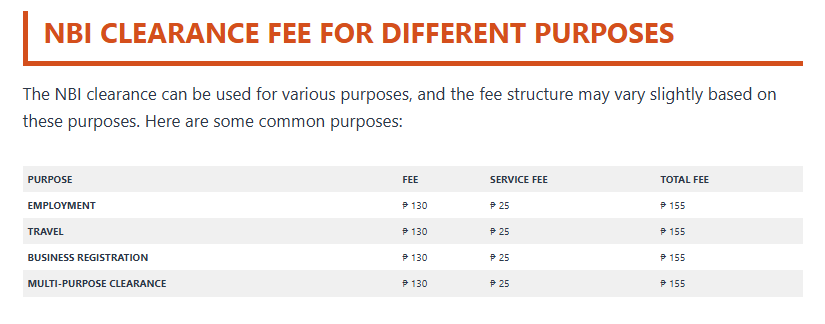
The NBI officially lists the basic clearance fee at ₱130 and notes that an additional e-payment service charge applies.
Why Is the Total More Than ₱130?
The ₱130 amount is the actual NBI Clearance fee.
When you pay electronically, the payment provider may charge an additional transaction or service fee.
This is why your payment screen may show an amount higher than ₱130.
For example:
₱130 NBI fee
₱25 service charge
=
₱155 total
If the payment channel charges ₱30 instead:
₱130 + ₱30 = ₱160
The final amount shown during your transaction should always be treated as the amount you need to pay.
How to Pay for NBI Clearance
After completing your online application and selecting your branch and schedule, you will be asked to choose a payment method.
The NBI currently lists payment options that include:
- GCash
- Maya
- 7-Eleven
- Bayad Center
- Online Banking
Available payment channels can change, so use the options displayed in your NBI Clearance account when making your application.
Step 1: Complete Your Online Application
Start at the official NBI Clearance portal:
Register or log in and complete your applicant information.
Make sure the details you enter match your valid government-issued IDs.
Step 2: Choose Your NBI Branch and Schedule
After completing your profile, select:
Apply for Clearance
Choose the NBI branch you want to visit and an available appointment schedule.
Do not pay until you have checked that the selected branch and application details are correct.
Step 3: Choose a Payment Method
The NBI system will show the payment methods currently available.
Depending on the system and your transaction, these may include:
GCash
A convenient option for applicants who already use a GCash wallet.
Maya
Maya may also be available as an electronic payment option.
7-Eleven
Applicants may be able to generate a payment reference and complete payment through participating 7-Eleven payment facilities.
Bayad Center
Bayad Center may also appear as an available payment channel.
Online Banking
Selected online banking methods may be available depending on the options currently displayed by the NBI payment system.
Step 4: Check the Total Amount Before Paying
Before confirming your payment, check:
- Your name
- Reference number
- Basic clearance fee
- Service charge
- Total amount
Do not assume that the final amount will always be exactly ₱155 or ₱160.
Payment service charges can vary.
The safest approach is to pay the exact amount displayed by the official NBI payment system.
Step 5: Save Your NBI Reference Number
This is very important.
The NBI system generates a reference number for your application.
Save it by:
- Taking a screenshot
- Writing it down
- Saving the confirmation page
- Keeping your payment receipt
You may need the reference number when completing payment and when visiting the NBI branch.
Step 6: Pay the Correct Amount
Complete the payment using the method you selected.
Avoid manually sending money to an individual, unofficial Facebook page, fixer, or person claiming to process your NBI Clearance.
Use only the payment details generated through the official NBI Clearance application system.
Step 7: Save Proof of Payment
After paying, keep a copy of the confirmation.
You can save:
- Screenshot
- Electronic receipt
- Payment confirmation message
- Transaction reference number
Do not delete the confirmation until you have successfully received your NBI Clearance.
How Do You Know If Your NBI Payment Was Successful?
After payment, log back into your NBI Clearance account and check the status of your transaction.
Your application should reflect that payment has been completed.
The NBI’s current guidance also notes that recent system updates provide a 15-day grace period once a transaction is marked PAID, allowing applicants some flexibility if they miss their original target date.
Still, it is better to attend your selected appointment whenever possible.
Can You Pay NBI Clearance Using GCash?
Yes.
GCash is currently listed by the NBI as one of its available payment methods.
When paying through GCash:
- Confirm the reference number.
- Check the amount.
- Complete the transaction.
- Save the confirmation screenshot.
- Check your NBI account afterward.
Do not close the payment screen until you have recorded the transaction information.
Can You Pay NBI Clearance Using Maya?
Yes.
Maya is also included among the payment options currently listed in the NBI application guide.
Follow the payment instructions generated by the NBI system.
Can You Pay at 7-Eleven?
7-Eleven is currently listed among the payment methods that may be selected through the NBI Clearance application process.
Make sure you bring or save the correct payment reference number.
Can You Pay at the NBI Branch?
The NBI Citizen’s Charter includes an over-the-counter payment process in its clearance workflow.
However, the NBI currently encourages applicants to complete their online application and payment process before visiting a clearance center.
For most applicants, paying online before your branch visit will make the process easier.
Is NBI Clearance Free for First-Time Job Seekers?
Qualified first-time job seekers may receive an NBI Clearance free of charge under the First Time Jobseekers Assistance program.
This is different from the regular ₱130 application process.
If you qualify as a first-time job seeker, use the dedicated first-time job seeker application process rather than paying the normal clearance fee.
Is the NBI Clearance Fee Different for Foreigners?
The NBI’s publicly available general application guide currently lists the standard basic clearance fee at ₱130.
Foreign nationals applying inside the Philippines should check the final fee displayed by the NBI system during their transaction.
For a complete guide for foreign applicants, see:
How to Get NBI Clearance for Foreigners in the Philippines (2026 Guide)
How Much Is NBI Clearance If You Apply From Abroad?
Applying from overseas is a different process.
The NBI currently states that mailed clearance applications from abroad involve:
- NBI Clearance Fee: ₱130
- Mailing Cost: ₱70
- Total: ₱200
for the mailed clearance process described on its official overseas application page.
This should not be confused with the normal online application made while you are physically in the Philippines.
NBI Clearance Payment Checklist
Before completing payment, make sure you have:
- Completed your online application
- Selected your NBI branch
- Checked your appointment details
- Generated your reference number
- Selected an official payment method
- Checked the service charge
- Checked the final total
- Saved your payment confirmation
Frequently Asked Questions
How much is NBI Clearance in 2026?
The basic NBI Clearance fee is ₱130. An e-payment service charge of around ₱25–₱30 is typically added, resulting in an estimated total of around ₱155–₱160.
Is NBI Clearance exactly ₱130?
₱130 is the basic NBI Clearance fee.
The amount you actually pay may be higher because of the payment provider’s service charge.
Why did my NBI payment cost more than ₱130?
Electronic payment channels may add a service or transaction charge.
Always check the final amount displayed by the NBI system.
Can I pay NBI Clearance through GCash?
Yes. GCash is currently listed by the NBI as an available payment method.
Can I pay with Maya?
Yes. Maya is currently included in the NBI’s payment options.
Can I pay at 7-Eleven?
7-Eleven is currently listed as one of the payment options available through the NBI application system.
Is the payment refundable?
Before paying, make sure your applicant details and transaction information are correct.
If you have a payment problem or need confirmation regarding a transaction, contact the NBI Clearance Center directly rather than making a second payment immediately.
Final Tip
Don’t focus only on the advertised ₱130 fee.
For budgeting purposes, prepare approximately:
₱160
for a normal NBI Clearance transaction completed through an electronic payment channel.
The actual amount may be slightly different depending on the service charge shown by your payment provider.
Always use the official NBI Clearance portal and keep your reference number and proof of payment until your clearance has been successfully released.
Official NBI website:
https://nbi.gov.ph
Official NBI Clearance portal:
https://clearance.nbi.gov.ph
2 thoughts on “NBI Clearance Fee 2026: How Much and How to Pay”